Mobile Product Design — 2026

Musicthatmoveswith you.

A mood-driven music experience that adapts playback around how you feel and the rhythm you're in.
Role
UI/UX Designer
Platform
Mobile App
Focus
Product Design · UI/UX · Interaction
Explore the experience ↓
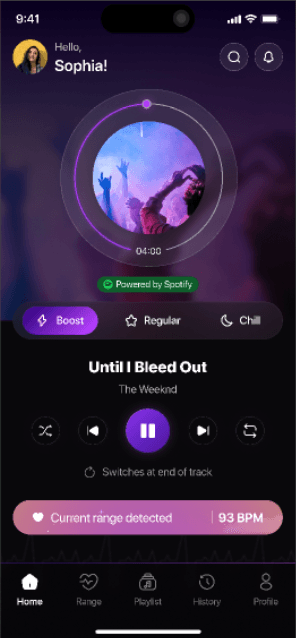
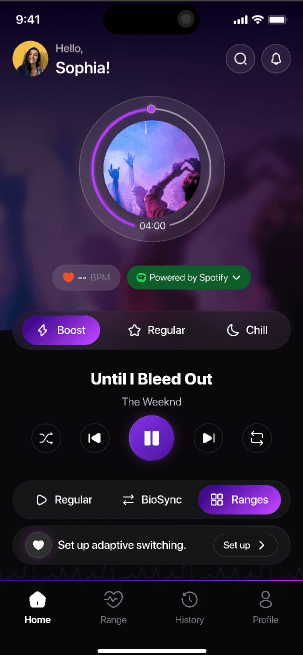
Boost mood home screen

02 — Overview

An adaptive music experience built around mood.

Traditional music players make you search, skip, and manually decide what comes next.

This product explores a different approach: music that responds to your mood and BPM range, while the listening experience stays as simple as pressing play.
Role
UI/UX Design
Platform
Mobile
Core experience
Mood + BPM based music
Key areas
Player · Ranges · Playlists · Integrations
03 — The idea
Boost
Regular
Chill
BoostRegularChill
BoostEnergetic. High contrast. Music that pushes the pace.
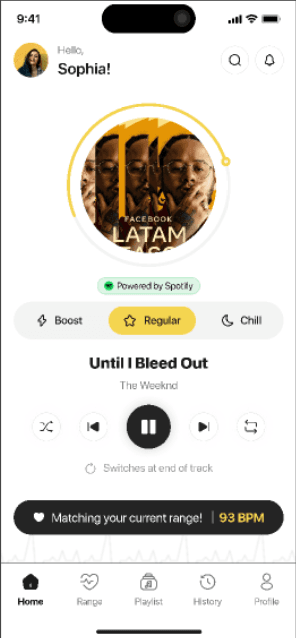
RegularBalanced. Light. Music that keeps you steady.
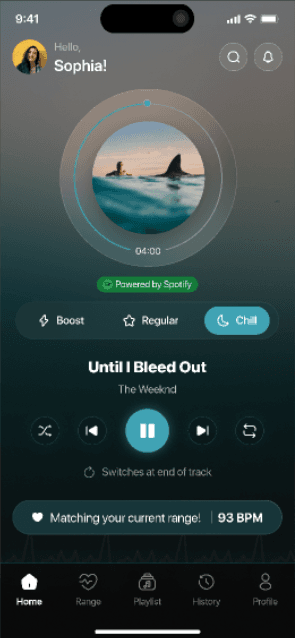
ChillCalm. Cool. Music that lets you slow down.
04 — The home experience

The player is the heart of the experience.
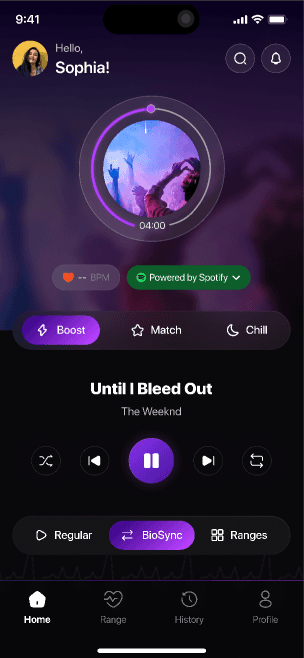
01 · Mood
Boost, Regular, Chill — one tap, and the whole screen responds.
02 · Music provider
Powered by Spotify or Apple Music, always visible.
03 · Current track
Artwork, progress and time live inside one ring.
Home screen, Boost mood
04 · BPM context
Your current BPM sits right under the track.
05 · Playback
Familiar controls. Nothing to relearn.
06 · Adaptive switching
Regular, BioSync or Ranges — the mode that picks the next track.

05 — Mood system

Designing mood as a visual language.

Boost, Regular and Chill aren't just labels. Each mood changes the atmosphere of the whole screen — colour, artwork, emphasis — while the interaction model stays exactly the same.

06 — Adaptive music

Making adaptive behaviour feel effortless.

BPM ranges connect your current state with the right music. Instead of exposing the logic, the UI speaks in simple feedback: a range detected, a match found, a switch coming at the end of the track.

“Let the system do the work without hiding what it is doing.”
Matching your current range — 93 BPM
Current range detected
Regular · BioSync · Ranges modes
Current rangeMatching your current rangeSwitches at end of trackBioSyncRanges

07 — Range management

Control when you want it.

Define BPM ranges, name them, set a minimum and maximum, assign playlists. Edit or remove them any time — the automation stays yours.

Scroll →
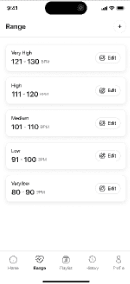
Range list
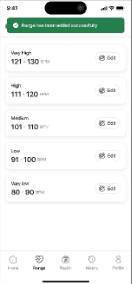
01 · Range list
Five ranges, Very low to Very high, each with its own BPM window.
Add range
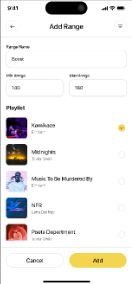
02 · Add range
Name, min and max BPM, then pick the playlists that belong to it.
Edit range
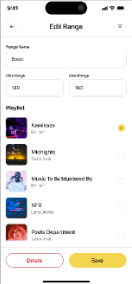
03 · Edit range
Same form, prefilled. Save or delete sit side by side at the bottom.
Delete confirmation
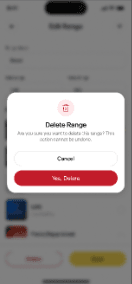
04 · Delete
A clear confirmation, in red, for the one action that can't be undone.
Range added confirmation
05 · Feedback
Success and error toasts close the loop without a modal.

08 — Playlists

Music is organised visually.

List view is built for fast scanning. Grid view leads with artwork for visual discovery. One toggle, same content.
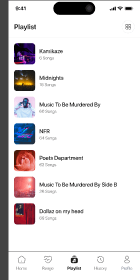
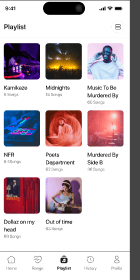
Playlist list view
Playlist grid view

09 — Integration

Connect the music you already use.

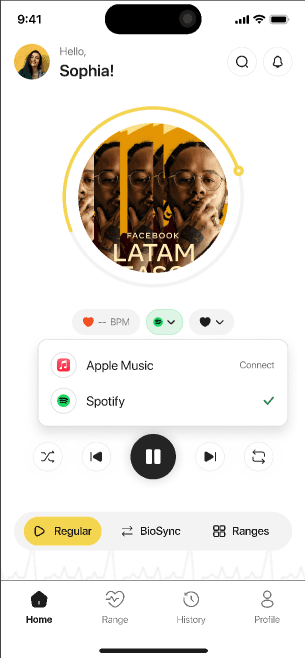
Spotify or Apple Music — connect once, switch any time from the player. The provider changes, the experience doesn't.
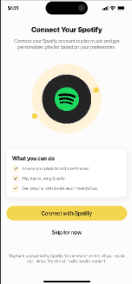
Connect your Spotify
Provider selector: Apple Music, Spotify

10 — Interaction details

Small interactions. Clear feedback.

Mood selection
Mood selection
Immediate visual feedback communicates the active mood.
Play / pause
Play / Pause
The primary control takes the mood colour; secondary controls stay neutral.
Adaptive switching
Adaptive switching
Music changes at the end of a track, never mid-song.
Range editing
Range editing
Customise the system without leaving the main experience.
Delete confirmation
Delete confirmation
Destructive actions ask once, in plain words.
Provider connection
Provider connection
Switch between Apple Music and Spotify from the player.

11 — Design system

A system designed to stay consistent.

Typography
Until I Bleed Out
The Weeknd
Title 20/600Body 15/400Label 12/500Meta 11/400
Colour
Boost · #7C3FE4
Regular · #F4CF3A
Chill · #38B6C9
Spotify
Destructive
Surface
Mood selector
BoostRegularChill
BoostRegularChill
BoostRegularChill
Buttons & pills
Connect with SpotifyYes, DeleteDelete♥ Matching your current range! 93 BPM● Powered by Spotify♥ -- BPM
Range card & input
High
111 · 120 BPM
✎ Edit
Range Name
Boost
Min
140
Max
180
Playback & navigation
⇄◀❚❚▶↻
▷ Regular⇄ BioSync▦ Ranges
HomeRangePlaylistHistoryProfile

12 — Key UX decisions

Design decisions that shaped the experience.

01

Mood becomes a visual system

Colour, artwork and emphasis change per mood, so the state is felt instantly — without reading a label.

02

BPM is translated into understandable feedback

“Matching your current range · 93 BPM” says what the system found and why — no thresholds to interpret.

03

Adaptive switching happens at a natural transition

Tracks change at the end of a song. Adaptation never interrupts what you're listening to.

04

Automation and customisation coexist

The system picks music on its own, yet every range and playlist behind it stays one tap away to edit.

13 — Final experience

From mood to music.

Boost
Regular
Chill

The experience keeps personalisation in the background while keeping mood, music and control at the centre.

Have a product worth designing?

Let's turn complex ideas into simple, meaningful experiences.

Let's talk →